Process, Product AND Lifecycle Use

There is a lot of debate over the acronym of BIM. I like the ‘brief primer’ from EcoDomus:

BIM is an acronym for a few things:
1) Building Information Modeling (virtual design process),
2) Building Information Model (a set of files and/or databases that includes 3D geometry and corresponding data), and
3) Building Information Management (lifecycle use of building data).

Their product focus is on the #3 version: Facilities Management, and they propose data integration and management across several well known controls systems. Check ’em out.

Posted in BIM/Revit | Tagged , | 2 Comments

3D or not 3D – that is the question

First off – not EVERYTHING in a virtual 3D model needs to be in 3D.
This is an important concept to emphasize, as the first impulse of a team is that everything will be 3D, and that can be overwhelming  (both in terms of content creation needs, but also potentially in file size management), particularly in projects with high customization (high-end residence, restaurants, etc).
Once a team realizes that not everything will be modeled, some users default to basic drafting (detail lines) to represent visually complex items, and that also needs to be reevaluated for efficiency and output impact.
My recommended strategic process of determining what needs to be 3D and what does NOT, and how those non-3D elements should be SMARTLY created, follows this analysis:

a)  Will the element need to scheduled / counted / assigned data?
b) What key views will the element be referenced in?  ie: Overall 3D? Interior perspectives? Interior elevations? Floor/Ceiling plans?
c) Are there manufacturer resources that could be leveraged? ie: downloadable CAD elevations, etc.
d) Is there a critical spatial impact that will be assessed for clash detection?

It needs to be Scheduled
This key requirement rules out detail line drafting, and defines that the element should be created as a component family (.rfa).  This does NOT however, require the component to be fully 3D modeled (see 2.5D Families).
*In place families can be scheduled, but are more difficult to coordinate with other components used in the model.

Views Element is Documented In
If the main views the element will be seen in are 3D/perspective views, then it should be modeled in 3D. Consider what plot scale those views will be presented in, and consider reducing the complexity of the geometry accordingly.

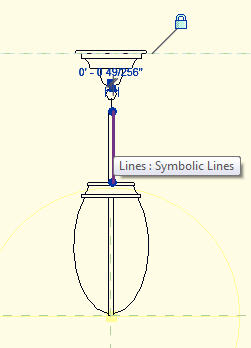
If the views will be only plans, then the geometry can be omitted from the family, and model or symbolic lines used in floor/ceiling plan views (a strictly 2D family).

This is especially efficient for very repetitive elements, such as recessed light fixtures, which are only represented in RCPs, but need to be scheduled for fixture counts, etc.

If the views the element will be represented in are BOTH floor/ceiling views and interior elevations, yet not involving 3D views, the most efficient creation route is a 2.5D family – 2D linework in 3 dimensions.

2.5D Families
Component families do NOT have to involve geometry.  Complex forms that will be represented only in 2D views in your documentation can be efficiently created using 2D linework in 3 views: plan, front elevation and side elevation.

Gather your resources
Many manufacturers provide downloadable CAD files of their products in both plan and elevation views. These can be leveraged to quickly create dimensionally accurate 2.5D families in Revit.  Insert the CAD elevation into both the front/back AND left/right elevations in the family editor, and pick/draft the linework.  Delete the embeded CAD file prior to saving/inserting into your project environment.


Parametric 2.5D
Omitting 3D geometry in the component family does NOT preclude creating smart, parametric families. Simply associate your key linework the same way you would for 3D geometries, focusing on the endpoints of lines, rather than planar surfaces of geometry.

Critical Clearance Issues
Some elements need critical clearances to ‘trigger’ the automated clash detection process in Revit.  A simple geometric form that is set to an ‘invisible’ material can accomplish this, with a custom subcategory to set the ‘clearance zone’ edges to dashed lines in plan/elevations.


Posted in BIM/Revit | Tagged , , | 1 Comment

Living Walls lecture

When: Tonight, February 16, 2012 –   6:30-9:30pm
Where: SFAIA  Office (130 Sutter St.)

www.tournesolsiteworks.comFind out more here.

Posted in Architecture, Nature | Tagged , | 2 Comments

Putting the I in IPD

More and more, subconsultants are being provided a Building Information Model rather than traditional 2D backgrounds, and are being asked to return a 3D deliverable in kind.  And with that, comes questions:

Q:  Do I have to use Revit, too?
A:  Not necessarily.  There are ways to utilize the Revit model within your current production tools, or at least to find a common platform between the two, for the means of viewing and interacting with the model.

Q:  My process will continue to be 2D – how can I translate this into a 3D environment that the Architect can use in their model?
A:  Defining an agreed upon deliverable is key.  Most architects, even when requesting a 3D deliverable, will accept a hybrid of 2D and 3D – a kind of ‘2.5D’ product that they can easily integrate into their own 3D environment. It is important to clarify what the prioritized emphasis will be on – visualization or documentation – and ensure your approach meets that purpose. This has great impact on the means and methods to achieve those goals.

Q:  How will this change in process benefit me?
A:  Being able to work directly with the Architect’s evolving model gives you better clarity of the environment of your scope of work, with less time wasted waiting for information lacking in 2D backgrounds. More information and better visualization up front means less re-work throughout the process and a happier client!

For assistance developing a workflow from Revit to your current design tool, clarifying deliverables, and developing workflow processes, contact info@apertedesign.com and let’s start talking!

Posted in Architecture, BIM/Revit | Tagged , , , | 2 Comments

Customizing PAT files

Most architectural firms are using Revit heavily for the visualization benefits, and as such want to get as close to reality representing key materials as possible. While some requests just don’t weigh out in the ‘pros/cons’ analysis (modeling battens on a facade, for example) I do believe in representing many materials by surface pattern, as long as the scale is manageable.

One project is setting up key perspectives through a lobby/reception space, and wanted to represent a unique tile layout to the client.  The pattern is a variation of a standard running bond, but with more offsets, and changes in widths of the primary rows.  As such, I thought it would make a good learning tool for understanding creating custom PAT files from scratch, rather than relying on a program to generate it.

UNDERSTANDING .PAT FILES:

PAT files are essentially simple .TXT files, with the extension changed so that a tool (ACAD, Revit) knows how to interpret the contained information.  A correctly structured TXT file (created in notepad, or other simple text editor) can be easily converted to a .PAT.

A PAT file is a definition of lines – typically straight forward horizontal and vertical lines, but they can define angled lines, as well. Arcing lines are defined as (very) short straight segments.  The lines have no variation in lineweight, and final scale of the pattern is determined by the defined units in the end program.

SKETCH AND ANALYZE YOUR DESIRED PATTERN:
As with many complex elements, it often helps to start out with a handsketch, or a photograph of the desired pattern effect.  Review the desired layout and identify the following:

a)     Primary horizontal / vertical elements
b)     Extent of vertical and horizontal repetition

The repetition identification will reveal how complex your PAT file will need to be. A simple repeating pattern may take only a few lines of definition, whereas a complex random-looking effect will require many, many more.  When learning the process, start simple and increase complexity as you grasp the effects of your lines of definition.
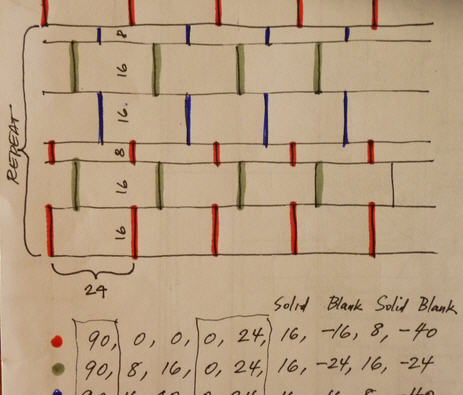
CREATE THE PAT DEFINITION:
PAT files follow a basic format:

(Line 1)Title, Description
(Line 2 – optional)  ;%TYPE = MODEL
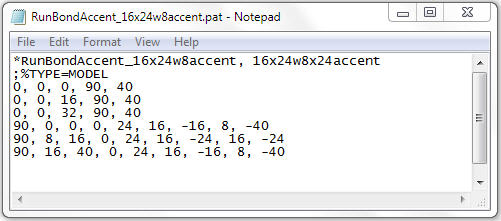
(*subsequent Lines): 0, 0, 0, 0, 24, 16, -16, 8, -40
*Define a new row for each unique line (horizontal and vertical) in your pattern.

The sequence breaks down like this:
A                B                     C
[0,  0 ,  0,] [0,  24,] [16,  -16,  8,  -40…]

A = Line direction, Start point (X), Start point (Y),
B = Shift direction, Offset distance,
C = Solid length,  (-)Blank length (as many needed per your repetition sequence)

In the case of my floor tile pattern, the horizontals were pretty straightforward:
0,  0,  0,  90,  40
0,  0,  16,  90,  40
0,  0,  32,  90,  40
Note that I needed to define three separate horizontals, before the sequence repeated itself.

The verticals were more varied, and involved more solid/blank increments:
90,  0,  0,  0,  24,  16,  -16,  8,  -40
90,  8,  16,  0,  24,  16,  -24,  16,  -24
90,  16,  40,  0,  24,  16,  -16,  8,  -40
Again, I needed only three, as that’s when the sequence repeats. Note the color highlighting in the handsketch, which really helps to clarify each vertical, and to identify the repetition sequence.

Once the simple Notepad file is completed and saved as a .PAT, it  can be imported into a Revit Fill Pattern, applied onto a Material, and used in the model assemblies:


Posted in BIM/Revit | Tagged , , | 4 Comments

I voted – I hope you did too!

Posted in Urbanism | 2 Comments

Is ‘the cloud’ still a dream?

Technically speaking, no.  ‘Working in the cloud’ is already a reality – look at your cloud-hosted email services and customer management tools – a tremendous amount of daily data exchange is already up there.   But should your team’s design data be, as well?

I ask this from a designer’s perspective – would I want to collaborate on MY projects in a ‘real time’ exchange with my consultants, my clients?  This is surely not an easy answer.

Who’s on the team?
A big first question is who would have access to the cloud-hosted design model? On many projects, only a few of the team members may be determined at the onset of the project, and others are added as time unfolds. Committing a project to the cloud environment could exclude potential collaborators who do not have the infrastructure (or skillset) to participate with that methodology.  Or, while it may not prevent them from drawing down your design/data, the limitations on their deliverables may circumvent the efficiency/benefits of YOUR workflow to support a cloud-enabled process.

Is ‘real-time design’ really necessary – or wanted?
Architectural design is rarely a purely linear process: we make decisions in plan, then change to form, then back to plan, then make decisions on structure, then reevaluate the impact to form, then back to plan, over and over.  Consultants, on the other hand, do work more linearly – in response to the guiding design decisions.  They are often looking for the ‘big moves’ – maximum height and total span; major services feed; proposed finish elevation.  They don’t – and in fact CAN’T – respond to every minor design edit, as they happen.  And if clients expect access to the real-time evolution of their project? Let’s ALL stop for a second and think that one through, shall we? That would be just a wee bit of pressure, wouldn’t it? If you’re a designer who doesn’t mind the potential of every shift or restrategy being critiqued before you reach a presentation point, have at it!

Does the cloud support my workflow?
The question about software licensing, and interoperability of programs hosted locally or in the cloud came up in a recent Revit User Group. No one really knows the answer, because every firm – in fact every project – may have a different set of tools and unique approach on how closely they all work together.  How about offices with network licenses who can’t dedicate a fixed number to one cloud-enabled project? How does my project tracking software manage distribution that happens from the cloud?  How does the IT department deal with one project having unique needs apart from all the other office projects (not to mention legacy projects being revisited?)

Is the cloud secure enough?
Another big open-ended question.  Security of data, in terms of bits, is fairly guaranteed.  Cloud service providers are masters at data storage and recovery, and often provide 24/7 service and even insurance against disaster.  What can’t be guaranteed, however, is if the access is secured. I’ve worked under NDA on several projects, while still wondering once I sent my PDFs through the internet just who was receiving them on the other end. Who ultimately controls access to a cloud-hosted project? How many users – vetted or not – might not recognize the need for privacy and or securing of sensitive information about the project? What liability is there when there are numerous people accessing the same pool of data?

Will internet access become a ‘weak link’?
If all of my design decisions reside on a remote server, by which I connect through a wire – am I at risk of being easily disconnected? Does all the state-of-the-art cloud storage technology hinge on the viability of my late-mid-century office building’s wiring? What if it does? What if it fails? What’s my back-up plan? If I do trust the cloud, and my access is lost, who covers that downtime? If I have to keep redundant on-site versions of everything hosted on the cloud, what’s the cost efficiency of cloud hosting, anyway?

I’m sure that these are just the tip of the iceberg – and equally sure that there are a lot of great benefits to taking the leap, and working in a fully collaborative digital environment.  I imagine that highly technical cross-discipline designs and schedule-driven projects (ie: hospitals and laboratories) are the foremost beneficiaries of such constant collaboration. My smaller scale projects would perhaps be more accessible to my structural engineer and could reduce our design timeline, and be more easily reviewed and approved by clients who could log on and take the design for a spin. Perhaps.

I’ve been following the hype of all the new cloud-enabled tools out there – Amazon hosting, Autodesk’s BIM Server, BIM9’s ‘private cloud’ setup services.  I’m glad to see them evolve and come to fruition – for some firms/projects – and hope that there will be public transparency as to how these experiments turn out.  I’ll continue to sit on the bench, however, regarding cloud-hosting my project designs, at least for now.


Posted in Architecture, BIM/Revit | Tagged , | 2 Comments

Double-clicking files from a browser

Teams new to Revit often fall back on old habits better suited to other programs – a common behavior I see is double-clicking files from a network browser to open them.  Not a good idea for Revit files!  Here’s why:

  • At the very low end of the ‘trouble in Mississipi’ scale, double-clicking as a means of opening both the software program AND the project file at the same time is an incredible tax on the processing capability of the machine. With a significantly sized model, this kills efficiency, as the opening may take multiple times longer than opening the program FIRST and then opening the file.  Worst case, it causes the user’s system to freeze up or crash.
  • If a project is workshared, double-clicking from a browser does NOT inform the user if they are opening the actual CENTRAL file, or creating a new LOCAL.  This isn’t the end of the world, but it can greatly hinder teams who find someone modeling directly in the CENTRAL file, and messing up the edit-tracking the Central file is typically doing.
  • At the HIGH end of the DANGER scale is the risk of unconsciously upgrading the versioning of the project file.  This is due to the install settings in Revit automatically seeking out the most current version of the software loaded.  The upgrade occurs in the opening sequence, something that could easily be missed by the user, and the first save after upgrading locks that versioning in permanently.  And if you don’t already know it, there is NO SAVING DOWN.  An upgraded file is permanently upgraded, and all collaborating Revit users then must use that upgraded version to access the file, even to update a link of that file.  This is a BIG DEAL, folks!

So resist opening Revit files by double-clicking from a browser.  Just DON”T DO IT!


Posted in BIM/Revit | Tagged , | 1 Comment

PARK(ing) Day with Green Roof Alliance

PARK(ing) DayIn the spirit of recapturing real estate devoted to motor vehicles and using that space to benefit the general public, I teamed with three other members of the Green Roof Alliance to design and construct a demonstration living roof to sit in our commandeered spot for the day.

The project had very simple goals:  a) participate in the spirit of PARK(ing) Day  b) educate the general public on the benefits of green/living roofs, and c) emphasize the dramatic change from hardscape to landscape.

For the demonstration roof, landscape architect Jim Davidge built a dog house (complete with screened front porch). The roof was outfitted with greenery, and the sides of the house were adorned with benefits of green roofs: Supports biodiversity; Insulates spaces below; Captures rainwater; Reduces heat island effect.  Informational cards were available that listed further benefits, and links to the Green Roof Alliance website for more information and member sites.

We were fortunate enough to get greenery (preseeded sedum beds, succulants and drought-resistant grasses and plants) donated from several sources: Flora Grubb, Native Sons and Paxton Gate.  They represented the broad range of suitable plants for roofscapes, on both the extensive (lighter, less maintenance) and intensive (deeper, heavier soils, more maintenance required) scope of installation.

For more information on the event, see the founders ReBar site, and a great summary write up by SF Streetsblog.

Hey! Someone  made a video of the SF event, and we get some camera time!


Posted in Urbanism | 2 Comments

Geometric Formula Parameters

Content creation is an evolving skill. Training team members to create symbolic furniture or equipment families is at the lower end of the skill set, where creating multi-referencing parametric families involving rules of proportion are at the higher end.  This post isn’t a step-by-step tutorial (which would only enable a reader to re-create THIS family) but is meant to underscore the thought processes and concepts that go into successful application of parametrics.

First off, define your goals. For this family, intended for a historic restoration project, classic balloon-like canopies with scalloped edges were needed at various sizes. As there were several constants (number of segments to each canopy; height/width proportion) it made sense to create a single family that would parametrically adjust for different sized types.

Where to start?  With a sketch. A hand sketch.

Nearly every complex family I work on starts with a hand sketch.  This allows me to define a strategy and starting point to build from. I attempt to think through these key issues:

a) Where can repetition help me?
b) What is changing across differently sized versions?
c) Where should the change happen from?
d) How will the end user place the component in the model, and
e) What is the most logical way for the end user to control the size change?

The last two issues are important – if you’ve ever loaded a complex component family that had so many bells and whistles to adjust that you don’t know where to begin to either place it or edit the available parameters, you know the result of not thinking through those end-user issues.  There needs to be a placement method that is intuitive and controllable, and an editing method that is clear and logical.

Here’s my thought process on this family:
a) A fixed number of segments meant I could create a single parametric canopy panel that would scale and then repeat that panel into a larger assembly.
b)  A change in radius should not only increase the panel’s width/height, but also needed to adjust the width of the scalloped edge.
c) All size changes should stem from the lower center of the canopy, aligned to the top of the door/window it was protecting. Therefore a change of size wouldn’t disrupt that alignment.
d) A user was as likely to place it in an elevation/3D view as in plan, so creating it face-based would make installation easier.
e) New types could be easily defined with the change to a SINGLE parameter: the radius.

Controlling the geometry of the panel:
The arching panel itself was pretty simple: a revolve set to the 20 degree fan around a central reference plane.  TIP: Because the arc of the profile needed to respond to adjusting reference planes, it needed to be sketched in the panel family, NOT a predefined/loaded profile shape.

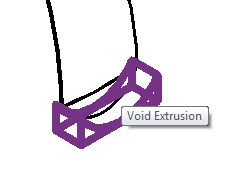
The dropped scallop edge needed to be two pieces: a simple sweep to create the edge depth, and an extruded void to cut away the edges leaving the scallop shape.

The void was the challenge, as when the controlling radius increased, the width of the void and the end points of its shape needed to adjust accordingly. It was a proportional relationship that required – wait for it! – a geometric formula.


Once I’d determined what formula would define the dimension needed to control the void (all based on the controlling parameter of radius) it was simple enough to apply using standard BOOLEAN language format.

The parametric panel was then nested into a family of the overall canopy, and arrayed into the 180 degree canopy. The key step is to ‘equalize’ the overall canopy parameter of Radius to control the individual panel’s governing parameter: Canopy Radius.

User application:
The conscious set up of the family to respond to a single parameter, pushing dimensional change from a central point (bottom center) gives the canopy the flexibility to be placed on it’s own, but also to be nested into a door or window family, and have the control logically passed through to the parameter controls of the host family.


Posted in BIM/Revit | Tagged , , , | 2 Comments